
Have you ever wanted to build your own website but felt that web development was too complicated or expensive? The good news is that you can learn to create a professional-looking website without being an experienced programmer. A free WordPress course is an excellent starting point for anyone who wants to understand website creation, blogging, online business, or web development.
WordPress is a popular content management system that allows users to create and manage websites without writing every line of code manually. You can use it to build a personal blog, business website, portfolio, educational website, or online store. As you gain experience, you can also explore customization, website performance, search engine optimization (SEO), and WordPress development.
In this guide, you will learn how to get started with WordPress, which topics to study, what tools you need, and how to practice your skills. Whether you are a student, freelancer, business owner, or complete beginner, this learning path will help you understand the essential steps toward building your first website.
Table of Contents
What Is a Free WordPress Course?
A free WordPress course is a learning program that teaches you how to create, customize, publish, and maintain a website using WordPress without charging a course fee. Depending on the course, lessons may include written tutorials, recorded videos, practical exercises, quizzes, and website-building projects.
Some courses focus on the basics, such as using the WordPress dashboard and publishing blog posts. Others cover advanced topics, including theme development, plugin development, custom functionality, and website optimization.
The best course for you depends on your goals. If you simply want to launch a blog or business website, you can begin with the basics. If you want to build websites professionally, you should gradually move toward technical subjects.
You can start with the official Learn WordPress website, which offers free educational resources for different skill levels.
Why Should You Learn WordPress?
Learning WordPress can help you develop practical digital skills that are useful for personal projects, businesses, and freelance work.
1. Build a Website Without Extensive Coding
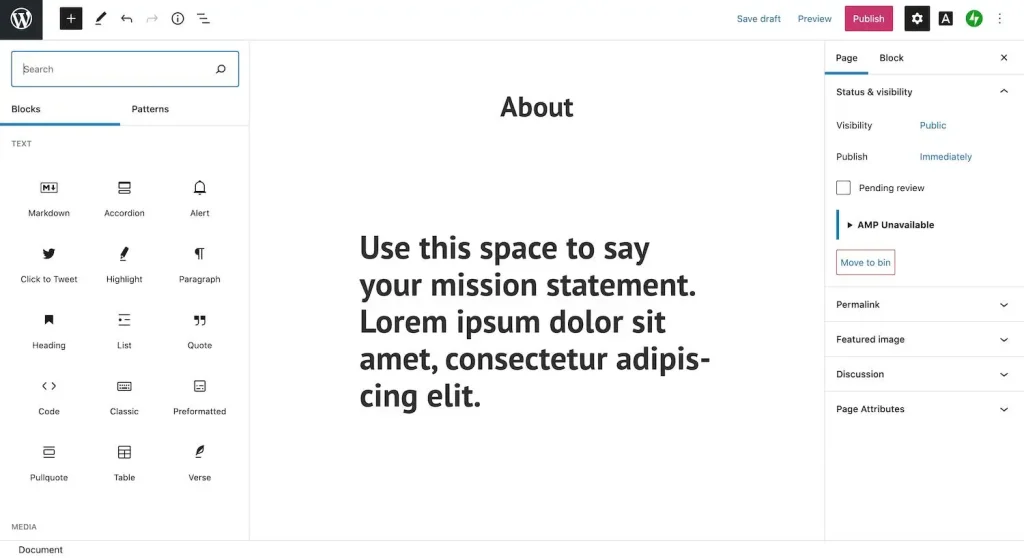
WordPress provides an editor that lets you create pages using blocks. You can add headings, paragraphs, images, buttons, galleries, and other elements through the dashboard.
This makes it possible to create a useful website before learning programming. You can study HTML, CSS, JavaScript, and PHP later if you want greater control over the design and functionality.
2. Start a Blog or Online Business
WordPress supports different types of websites. You can publish articles, showcase services, display a portfolio, share educational content, or create an online shop using suitable extensions.
For small business owners, learning WordPress can make it easier to update website content independently rather than relying on a developer for every small change.
3. Explore Freelancing Opportunities
WordPress skills can be useful for freelancers who provide website setup, content management, website redesign, maintenance, and customization services.
However, completing a course alone does not guarantee employment or income. Practical experience, a portfolio, communication skills, and the ability to solve real website problems are important when working with clients.
4. Learn the Basics of Web Development
WordPress can also introduce you to website structure, databases, templates, hosting, security, and performance. These concepts provide a foundation for learning more advanced web development techniques.
What Do You Need Before Starting a WordPress Online Course?
You do not need to be a professional developer to begin a WordPress online course. A few basic tools and skills are enough.
- A computer or laptop with a modern web browser.
- A stable internet connection for online lessons.
- Basic computer skills, such as managing files and using websites.
- An email address if your chosen learning platform requires an account.
- A practice website or local development environment.
You can start learning through demonstrations before purchasing a domain name or hosting plan. WordPress Playground is another option for experimenting with WordPress in a browser.
If your goal is to publish a website that the public can visit, you will generally need a domain name and a suitable hosting arrangement. These may involve costs even when the educational course itself is free.
Step-by-Step Free WordPress Course for Beginners
A structured learning path helps you understand each topic before moving to the next one. Follow these steps to develop your WordPress skills.
Step 1: Understand What WordPress Does
Begin by learning how WordPress works and what a content management system is.
Understand the difference between WordPress software and a hosted website-building service. WordPress software can be installed on compatible hosting, giving you control over themes, plugins, and website settings. The available features and costs depend on your hosting and service arrangement.
Learn the basic terms, including domain name, web hosting, website database, theme, plugin, page, and post.
Step 2: Explore the WordPress Dashboard
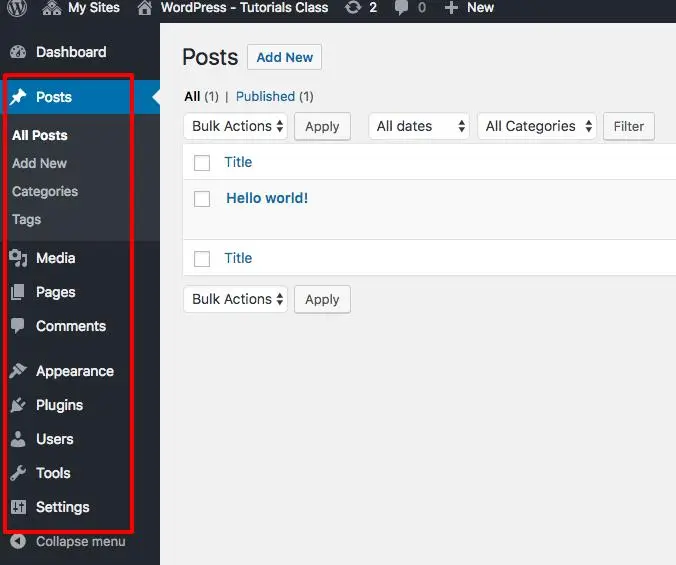
The dashboard is the administrative area where you manage your website.
Spend time exploring the main menu and learning where to find posts, pages, media, appearance settings, plugins, users, and general settings. The available menu options may vary depending on your WordPress version, theme, and installed plugins.
Do not worry about understanding everything immediately. Focus on the features you will use most often.
Step 3: Learn About Posts and Pages
Posts and pages serve different purposes.
Posts are commonly used for blog articles, news, and regularly published updates. Pages are generally used for relatively permanent information, such as About Us, Contact, Services, and Privacy Policy.
A well-organized website uses both where appropriate.
Step 4: Choose and Customize a WordPress Theme
A theme controls much of your website’s visual presentation and layout. Your choice affects how visitors see your content and how easily you can customize the site.
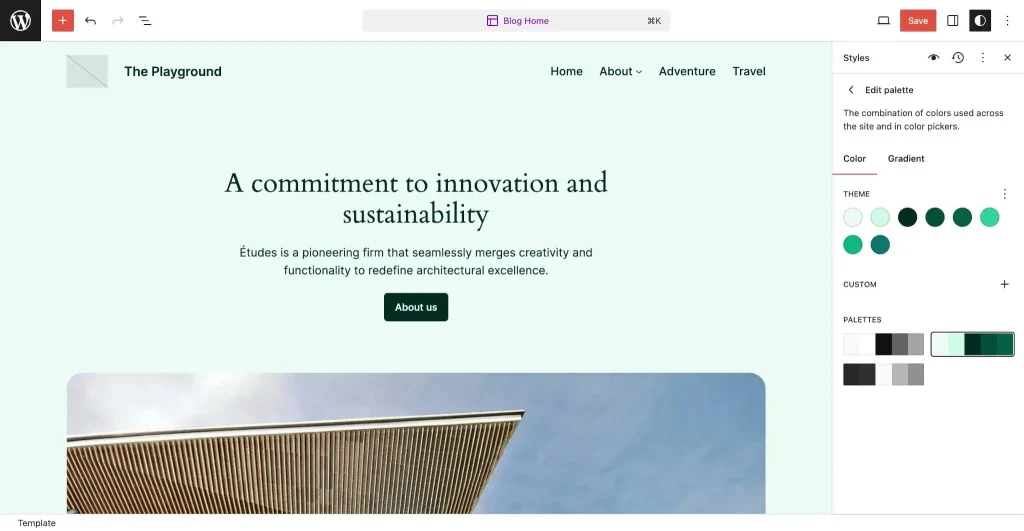
Start with a lightweight theme that supports the features you need. If you use a block theme, you may be able to customize templates, headers, footers, colors, typography, and layouts through the Site Editor.
Avoid installing several themes simply to test them on a live website. Experiment on a practice site first, and check compatibility before making major changes.
Step 5: Understand WordPress Plugins
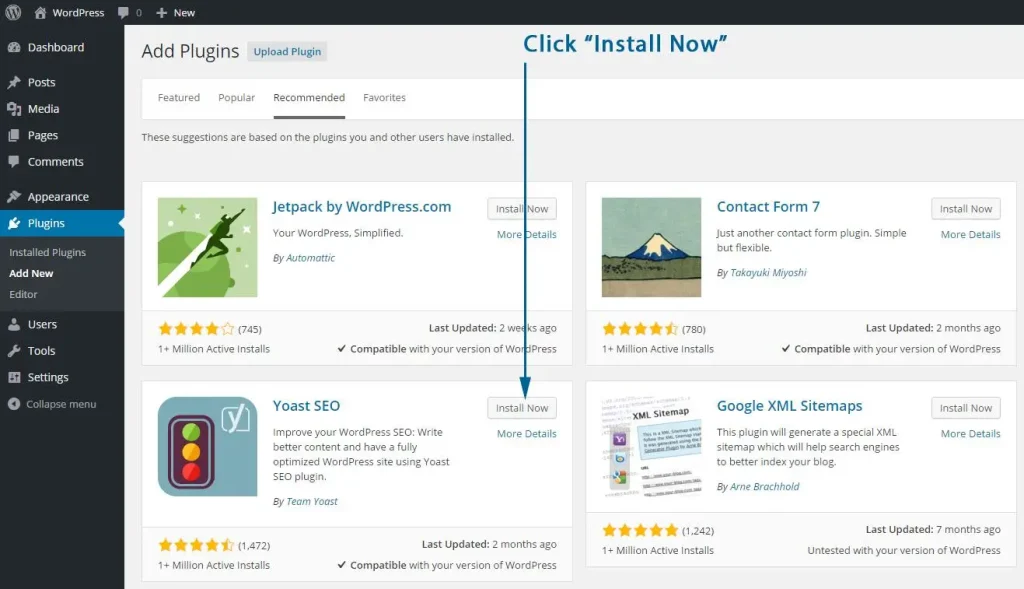
Plugins extend WordPress with additional features. Depending on your requirements, a plugin may help with contact forms, backups, SEO, security, performance, or online selling.
However, installing more plugins does not automatically improve a website. Unnecessary or poorly maintained plugins can introduce compatibility, performance, or security problems.
Before installing a plugin, review its features, compatibility information, update history, documentation, and support options. Download plugins from trusted sources.
Step 6: Build Your First WordPress Website
Now bring the basics together by creating a small website around a specific purpose.
For example, a portfolio website might include:
- Home: A brief introduction and overview of your work.
- About: Your background, skills, and experience.
- Services: The services you offer.
- Portfolio: Examples of completed projects.
- Contact: A form or other appropriate contact information.
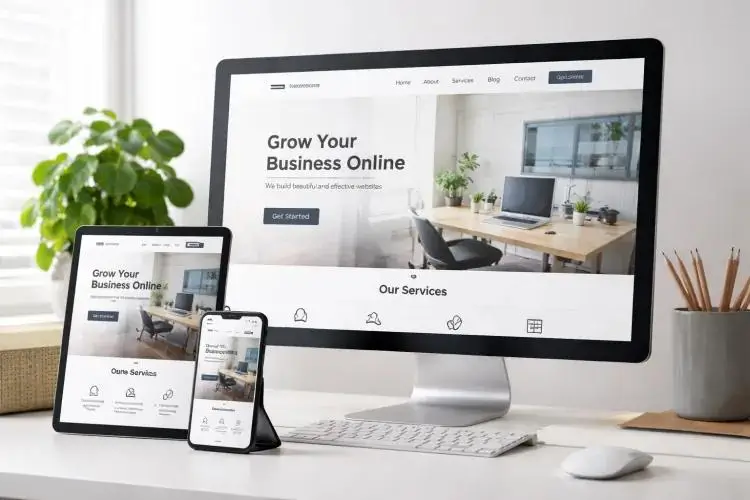
Make the navigation clear and ensure that the website works on mobile devices. Use real information wherever possible, and avoid adding unnecessary design elements that distract from the content.
Step 7: Learn Basic WordPress SEO
Search engine optimization helps search engines understand your content and helps people find useful pages through relevant searches.
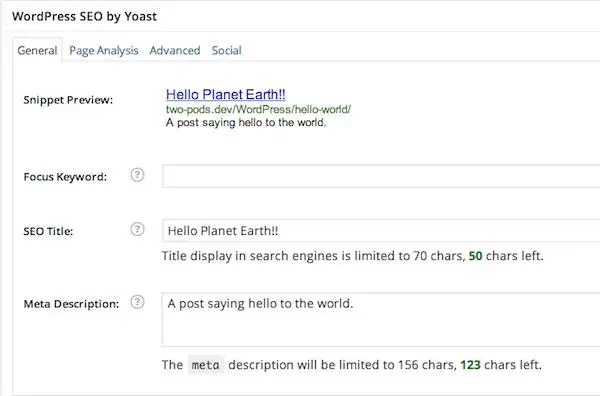
Start with a clear page title, descriptive headings, helpful content, readable URLs, meaningful image alt text, and links between related pages.
For a blog post, include your main keyword where it makes sense, particularly in the title, introduction, and a relevant heading. Do not repeat it unnaturally or force every related keyword into the same paragraph.
You should also understand XML sitemaps, indexing, canonical URLs, and how to use Google Search Console to monitor your website’s search performance.
Step 8: Learn Website Maintenance and Security
Building a website is only the beginning. Regular maintenance helps keep it reliable and secure.
Use strong passwords, enable appropriate user permissions, maintain backups, and update WordPress, themes, and plugins after checking compatibility. Remove software you no longer need and use a secure connection for your website.
Before making major updates, take a backup and test the changes when possible. If your website handles customer information or online payments, pay particular attention to access control, privacy, and security requirements.
Practice task: Create a maintenance checklist covering backups, updates, user accounts, and basic security checks
What Is Included in a WordPress Full Free WordPress Course?
A comprehensive WordPress full course should cover more than installing a theme and publishing a page. It should take you from the fundamentals to practical website management.
A useful curriculum includes:
- WordPress fundamentals and website terminology.
- Domain names, hosting, and installation.
- Dashboard navigation and general settings.
- Posts, pages, categories, tags, and media.
- Themes, templates, and website customization.
- Plugins and additional website functionality.
- Menus, navigation, and responsive layouts.
- SEO fundamentals and content organization.
- Website backups, security, and maintenance.
- Performance optimization and troubleshooting.
- Practical website projects.
- An introduction to advanced development concepts.
Not every free course includes every topic. Compare the lesson outline with your learning goals before choosing a program.
WordPress Developer Course: What Should You Learn?
If you want to move beyond managing a website, consider a WordPress developer course.
Development involves understanding how WordPress works internally and learning to customize its behavior safely. The exact skills you need depend on whether you want to work on themes, plugins, blocks, or integrations.
HTML, CSS, JavaScript, and PHP
HTML provides structure, CSS controls presentation, and JavaScript supports interactive features. PHP is widely used in WordPress server-side development.
You do not need to master all these technologies before using WordPress. However, learning them progressively will help you troubleshoot issues and build more customized websites.
Themes and Templates
Learn how themes control layouts and how templates, template parts, and styles work together. Modern block themes use the Site Editor, while other themes may rely on different customization methods.
Plugins and Hooks
WordPress provides hooks that developers can use to extend functionality. Actions allow code to respond to events, while filters allow values to be modified.
Study these concepts through small examples before attempting complex customizations.
Blocks and the WordPress Development Environment
As you progress, explore block development, local development tools, debugging, and version control.
Always test custom code in a safe development environment. Avoid experimenting with unfamiliar code directly on a production website, particularly when the site serves customers or generates business.
For a structured starting point, explore the official Beginner WordPress Developer course.
WordPress Development Course vs. WordPress Website Development Course
These course names may sound similar, but they often focus on different learning outcomes.
A WordPress website development course may concentrate on building complete websites with themes, plugins, page layouts, navigation, forms, and content management tools. It is suitable for beginners who want to create functional websites.
A WordPress development course may go deeper into programming, custom themes, plugin development, APIs, blocks, and debugging.
If your goal is to build websites for local businesses or personal projects, start with website creation and customization. If you want to develop custom WordPress functionality, continue into programming and developer-focused lessons.
How to Choose the Best Free WordPress Course
Not every course provides the same depth or teaching quality. Review the following points before investing your time.
Check the Course Syllabus
Look for a clear sequence of lessons. A good beginner course should explain the fundamentals before moving into advanced customization.
Look for Practical Exercises
Watching videos can help you understand a concept, but performing the task yourself builds confidence. Choose lessons that include demonstrations, exercises, and complete projects.
Check Whether the Content Is Current
WordPress changes over time. Prefer courses that explain the tools and interfaces you will actually use, and check when the material was last updated.
Review the Instructor’s Experience
Look for relevant experience, examples of completed projects, clear explanations, and a consistent record of helpful instruction. Do not assume that a course is reliable simply because it has a professional-looking website.
Understand Any Additional Costs
A free course may still recommend paid hosting, premium themes, or paid plugins. Check what is genuinely required and whether a free alternative is suitable for your project.
Where Can You Learn WordPress for Free?
The following resources offer useful starting points for different learning needs.
1. Learn WordPress
Visit Learn WordPress for free lessons, courses, workshops, and learning pathways. You can begin with website management and move toward design or development as your skills improve.
2. WordPress Documentation
The official WordPress documentation is useful when you need detailed instructions on installation, publishing, customization, maintenance, and security.
3. WordPress Developer Resources
Explore WordPress Developer Resources when you are ready to study technical documentation, development tools, APIs, and code-related topics.
Use the official course material to learn the concepts, then practise on a test website. This combination helps you build confidence while learning to solve real problems.
A Simple 30-Day WordPress Learning Plan
You do not need to study everything at once. A four-week plan gives you a manageable way to practise.
Week 1: Learn the basics.
Understand WordPress, explore the dashboard, and practise creating posts and pages.
Week 2: Customize a website.
Choose a theme, organize navigation, create a homepage, and learn how plugins work.
Week 3: Improve content and SEO.
Write useful content, optimize headings and URLs, add image descriptions, and connect related pages through internal links.
Week 4: Complete a project.
Build a small website, test it on mobile, check its links and forms, review security basics, and prepare a maintenance checklist.
By the end of the month, you should have a practical project that demonstrates what you have learned. Your progress will depend on the time you spend practising and the complexity of your chosen project.
Common Mistakes to Avoid When Learning WordPress
Beginners often make faster progress when they focus on a few common problems.
Installing too many plugins:
Start with the features you actually need and check compatibility.
Choosing design over usability:
Make navigation, readability, and mobile usability priorities.
Ignoring backups:
Back up your website before major changes
Using outdated tutorials without checking:
Compare instructions with current documentation.
Skipping practical work:
Build a small website instead of only watching lessons.
Expecting instant results:
Development skills improve through practice, testing, and troubleshooting.
Overusing SEO keywords:
Write for readers and use keywords naturally where they fit the topic.
A simple, functional website is a better learning project than a complicated site that you cannot maintain.
Conclusion
A free WordPress course can be a practical first step toward learning website creation, content management, and web development. Start with the dashboard, posts, pages, themes, and plugins. Then move into SEO, security, performance, and more advanced development topics as your confidence grows.
You do not need to become an expert in every area before building your first website. Choose a clear goal, follow a structured learning path, and practise each lesson on a project of your own.
Start with the free resources at Learn WordPress, create a small website, and improve it one step at a time. The most valuable outcome of your learning journey is not simply completing a course; it is being able to build, maintain, and improve a website independently.
FAQ section for the article
Can I learn WordPress for free?
Yes. You can learn WordPress through free lessons, documentation, and practical exercises. The official Learn WordPress website provides courses for beginners and more advanced learners. Publishing a public website may still involve domain or hosting costs.
Which is the best free WordPress course for beginners?
The official Learn WordPress website is a good starting point. Choose a beginner course that covers the dashboard, pages, posts, themes, plugins, and practical website-building exercises.
Can I learn WordPress without coding?
Yes. You can create and manage many websites using the block editor, themes, and plugins without writing code. Coding becomes useful when you want more control over customization or need to develop custom features.
How long does it take to learn WordPress?
You may learn the basics within a few days or weeks, depending on your available time and prior experience. Building confidence with customization, troubleshooting, and development generally requires continued practice.v
Is a WordPress online course enough to get a job?
A course can provide foundational knowledge, but employment also depends on practical skills, portfolio projects, problem-solving ability, communication, and the requirements of the role.
What is the difference between a WordPress user course and a developer course?
A user course focuses on building and managing websites. A developer course goes further into coding, themes, plugins, blocks, APIs, and technical troubleshooting.
Can I build a website after completing a free WordPress course?
Yes. With consistent practice, you can learn to create a website with pages, navigation, a suitable theme, and essential functionality. The complexity of the website will depend on the skills you develop.
Do free WordPress courses provide certificates?
Some learning providers may offer certificates or completion records, while others focus on lessons and practical exercises. Check the individual course details before enrolling.
Do I need hosting to practise WordPress?
Not necessarily. You can use browser-based tools such as WordPress Playground or a suitable local development environment to practise. A public website generally needs an appropriate hosting arrangement.
Can I become a WordPress developer without a degree?
A degree is not always required for WordPress development roles. Practical skills, knowledge of relevant technologies, a portfolio, and the ability to solve problems can be important, although individual employers may have specific requirements.